How to Find Digital Content That Has Become Difficult to Search for After Its Title Was Changed
You are suddenly struck by a wave of nostalgia and crave a song you used to listen to on repeat, a movie you streamed last year, or a web novel you bookmarked months ago. You confidently type the title into the platform’s search bar, hit enter, and get exactly zero results. Your immediate thought is usually the worst-case scenario: the content was permanently deleted due to copyright strikes, platform bans, or the creator wiping their digital footprint.
In reality, within the fast-paced, highly commercialized digital content industry, permanent deletion is incredibly rare. Instead, your favorite digital content was likely rebranded. Movies get new, localized titles when distribution rights change hands between regions; songs are pulled down and re-uploaded under remastered compilation albums; and amateur web-series are completely renamed when they are picked up for official platform serialization.
When the front-facing display title changes, conventional text searches become entirely useless. To track down your “lost” digital content, you need to stop searching like a casual user and start relying on unchangeable backend platform metadata. Here are the most effective, industry-level digital hacks to find renamed music, streaming series, and digital publications.

Quick Reference: Metadata Search Strategy by Content Type
Before diving into the detailed technical steps, use this quick reference matrix to understand exactly which hidden identifiers you should be looking for based on the media type you have lost.
| Digital Content Type | Useless Search Query (What changes often) | Unchangeable Metadata (What you MUST search) | Best Database & Aggregator Tools |
| Music & Audio | Track Title, Album Name | Composer (작곡), Lyricist (작사), ISRC, Album ID | MusicBrainz, Spotify/Melon Credits Tab |
| Movies & VODs | Localized Movie Title | Director, Lead Actor, Original Release Year | KinoLights (Korea), JustWatch (Global) |
| Webtoons & Comics | Display Title, English Translated Title | URL titleId, Illustrator/Author Pen Name | Naver/Kakao Internal Search, Namuwiki |
| eBooks & Novels | Book Title, Volume Number | 13-digit ISBN, Publisher Catalog | Major Bookstore DBs, Fandom Wikis |
Finding renamed music through behind-the-scenes metadata
Music tracks frequently disappear from major audio platforms like Spotify, Apple Music, or Melon. This phenomenon usually occurs when an artist switches record labels, or when a temporary distribution contract expires. The new label will often pull the track down and re-upload it with a slightly altered title – perhaps adding “Remastered,” changing a localized title to its English equivalent, or grouping it into a new album. When this happens, your old playlist links die.
Pivot to Composer and Lyricist Credits: While the commercial track title and even the primary artist’s stage name might change due to legal disputes or rebranding, the underlying copyright metadata rarely does. The individuals who actually wrote the song – specifically the Composer (작곡) and Lyricist (작사) – are legally bound to the track. Instead of searching for the song title, type the exact name of the producer or lyricist into the search bar. This will bring up their entire copyrighted catalog, allowing you to easily spot the re-uploaded track.
Track the ISRC or Album ID: Every commercially released song in the world is assigned an International Standard Recording Code (ISRC), acting as a digital fingerprint. More practically for everyday users, streaming platforms assign a unique Numeric ID to every album and track. If you have an old, dead link to a track, look closely at the URL. Copy the string of numbers at the end (the Album ID or Track ID) and search for it directly on a global database like MusicBrainz, or simply Google the ID alongside the platform name. This permanent identifier will often redirect you to the newly uploaded, rebranded version of the song.
Locating rebranded movies and streaming series via aggregators
The ongoing “Streaming Wars” have created a highly fragmented VOD (Video on Demand) market. Movies and TV series frequently change titles when moving between competing streaming services (such as Netflix, Amazon Prime, Watcha, or TVING). This is largely due to regional localization strategies or shifting distribution licenses. For example, an indie film known as Title A in theaters might be rebranded with a much flashier Title B when an OTT platform buys the exclusive rights for a specific country.
The Director and Cast Pivot Strategy: If a specific movie title yields no results on your streaming app, shift your search entirely to the Director or the Lead Actor. Streaming platforms utilize robust internal tagging systems. By searching for a specific actor and clicking on their profile, the platform will display their entire filmography available on that service. You can then easily identify the movie by recognizing its cover poster or synopsis, regardless of what new name the marketing team gave it.
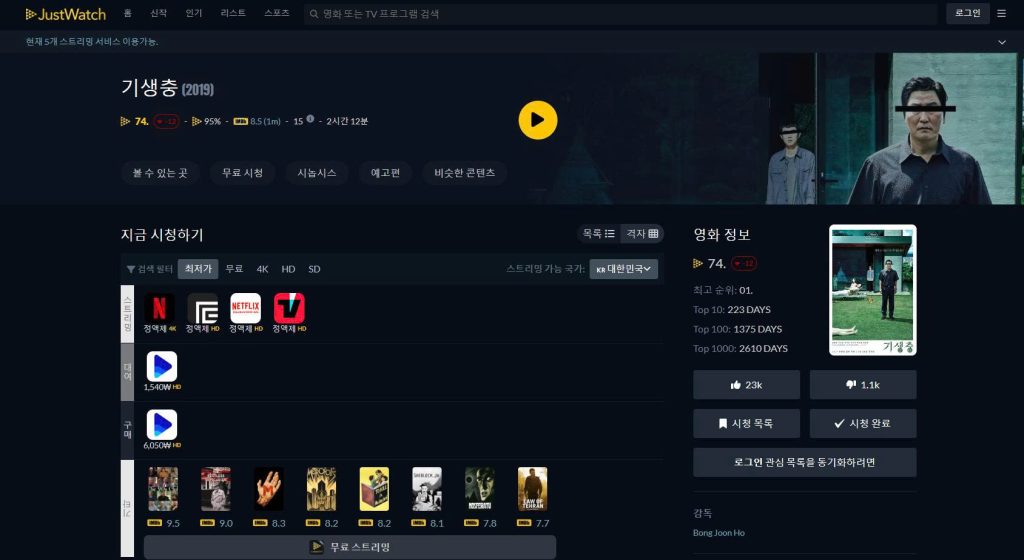
Utilize Third-Party OTT Aggregators: Never rely on a single streaming platform’s search bar, as their internal search engines only index their current, active catalogs. Instead, use cross-platform aggregator databases like KinoLights (키노라이츠) in South Korea or JustWatch globally. These platforms exist specifically to track the licensing history of VODs. If you type the old, outdated title into an aggregator, its backend database will automatically cross-reference historical data, show you the current rebranded title, and provide direct links to whichever streaming service is hosting it right now.
Tracking lost webtoons and eBooks using numeric IDs
In the digital publishing and webtoon industry, name changes are a standard business practice. Amateur series posted on free boards are frequently renamed by corporate editors to be “catchier” or more SEO-friendly when they are picked up for official, paid serialization.
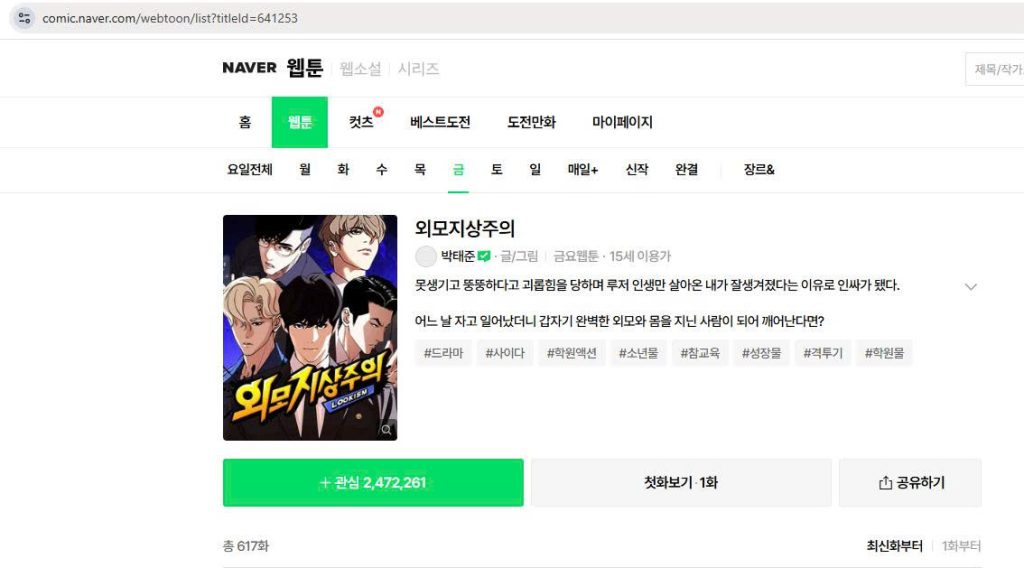
The URL Parameter Hack: Massive digital content platforms (like Naver Webtoon, KakaoPage, or Ridibooks) manage millions of uploads. To keep databases stable, they assign a permanent Numeric ID to every single series upon creation. If you look at an old bookmarked link or a link sent in a chat, you will see a parameter at the end, such as ?titleId=123456. That 6-digit number is the absolute DNA of the content. Even if the publisher changes the display title ten times, the ID remains identical. To find the series, simply click on any currently active webtoon on the platform, go to your browser’s address bar, and replace its ID with your saved number. Hit enter, and the server will bypass the title text check entirely, routing you directly to the rebranded page.
Leveraging ISBNs for eBooks: For digital books and light novels that have changed publishers and received new titles, check your old email purchase receipts. Look for the ISBN (International Standard Book Number). Searching this 13-digit code on major bookstore databases will immediately link you to the edition family, bringing up the newest, rebranded version of the book.
Relying on community wikis and archive platforms
When all technical metadata fails—perhaps you have no old links, no receipts, and don’t remember the creator’s name – you must rely on the collective hive-mind of the internet.
Community-driven wikis like Namuwiki (나무위키) in Korea or Fandom.com globally are absolute powerhouses of crowdsourced information. Hardcore fans meticulously track every micro-update, licensing shift, and controversy in the digital content sphere. If you type the old, outdated title directly into a wiki search bar, the site usually features a built-in redirect command (#redirect). Searching for an obscure amateur webtoon title or an old indie movie name will automatically “teleport” you to a heavily detailed page bearing the new, official title.
Furthermore, these wiki pages always include a “Publication History” or “Release Timeline” section, detailing exactly when the content was rebranded and why. By shifting your strategy away from basic text searches and utilizing hidden credits, numeric URLs, and community aggregators, you can ensure that no digital content ever stays lost to you again.